Microsoft Security | Microsoft Graph
An API that connects multiple Microsoft services, enabling data access and automation across platforms

This browser is no longer supported.
Upgrade to Microsoft Edge to take advantage of the latest features, security updates, and technical support.
' cx='32' cy='32' r='32' /%3E%3Ctext x='50%25' y='55%25' dominant-baseline='middle' text-anchor='middle' fill='%23FFF' %3ERJ%3C/text%3E%3C/svg%3E)
we have different users and for them, I can create events with meeting in their calendars by using graph API but in Case any user is not available to attend the event so I want that any other co-organizer or co-host can attend that event, I don't know how to create events with a co-host or co-organizer
so here the organizers are tutors and attendees are students so I mean if any tutor is not available to take the class so there should be a co-host or co-organizer(co-teacher) of that meeting( class ) so they can take the class in place of an unavailable tutor
An API that connects multiple Microsoft services, enabling data access and automation across platforms

Hi, Ritik Joshi (sorry, hard to find the exact person to at)
I believe that you do this by amending a meeting participant's 'role' type in the 'participants/attendees' key/value pair in the parent event:
https://learn.microsoft.com/en-us/graph/api/resources/onlinemeeting?view=graph-rest-1.0
Here's the breakdown of a 'meeting participant' in graph:
https://learn.microsoft.com/en-us/graph/api/resources/meetingparticipantinfo?view=graph-rest-1.0
Ensure that you change the 'role' value to "coorganizer" as per this learn link would suggest. :)
| Label | Value |
|---|---|
| Request Type | PATCH |
| URL | https://graph.microsoft.com/v1.0//me/onlineMeetings/{meetingId} |
| Headers | 'Content-Type': "application/json" |
| Body | See below |
{
  "participants": {
    "attendees": [
      {
        "upn": "******@domain.tld",
        "role": "coorganizer",
        "identity": {
          "application": null,
          "device": null,
          "user": {
            "id": "i-represent-a-microsoft-guid",
            "displayName": null,
            "tenantId": "i-represent-a-microsoft-guid"
          }
        }
      }
    ]
  }
}
' cx='32' cy='32' r='32' /%3E%3Ctext x='50%25' y='55%25' dominant-baseline='middle' text-anchor='middle' fill='%23FFF' %3EBK%3C/text%3E%3C/svg%3E)
Hi @Ritik joshi ,
You can request /me/onlineMeetings/createOrGetAPI, and then add the organizer to the request body.
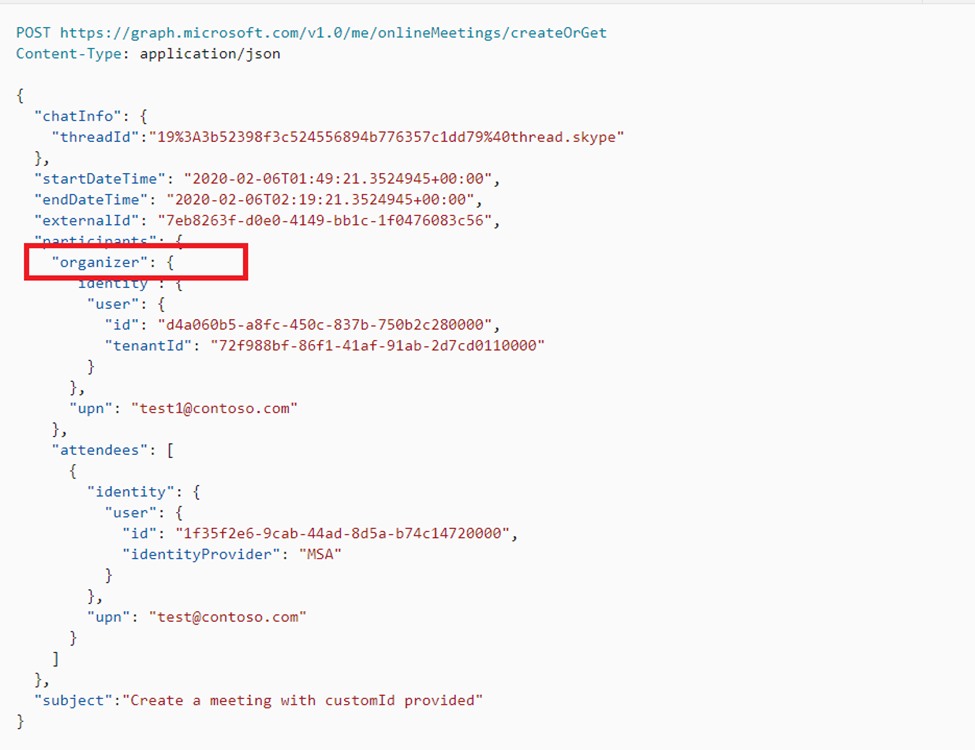
Please refer the below links
https://learn.microsoft.com/en-us/graph/api/onlinemeeting-createorget?view=graph-rest-1.0&&tabs=http
Hope this helps.
If the answer is helpful, please click Accept Answer and kindly upvote. If you have any further questions about this answer, please click Comment.
Apologies, but, unfortunately this does not answer the question.
Multiple organisers are clearly an option as we can affect that via meeting options in Teams.
However, this is not represented by the linked documentation and imagery provided.