Share via

How to fix: 0x800ccc0e and 0x800 errors outlook 365 windows 11 - Tried Everything!

Donna MacKinnon 0 Reputation points
2026-03-11T14:00:57.46+00:00

My Outlook was working perfectly until I turned on my computer this morning. I logged in but immediately got a Send/Receive error. My internet connection is fine. This is my error message:

Task 'Synchronizing subscribed folders for .' reported error (0x800CCC0E) : 'Outlook cannot synchronize subscribed folders for . Error: Cannot connect to the server. If you continue to receive this message, contact your server administrator or Internet service provider (ISP).'

I have tried any and every suggested fix I could find but it is still not working. Is someone able to help me please! I've spent over 3 hours on this and am getting quite frustrated!

Thank you!

Outlook | Windows | Classic Outlook for Windows | For business
{count} votes

Answer accepted by question author
  1. Michelle-N 13,175 Reputation points Microsoft External Staff Moderator
    2026-03-11T14:37:33.67+00:00

    Hi @Donna MacKinnon

    Based on the information you shared, I understand that Outlook was working normally before, but after turning on your computer today you immediately started receiving a Send/Receive error (0x800CCC0E) stating that Outlook cannot synchronize subscribed folders and cannot connect to the server, even though your internet connection appears to be working.

    After looking into similar cases, it appears that some users have recently reported experiencing the same behavior, and the issue is currently being investigated in certain environments. Please refer the following document:

    Users get errors 0x800CCC0E & 0x800CCC0F synchronizing Gmail and Yahoo accounts in classic Outlook

    At the moment, you may try the following workaround steps, which have helped some users in similar situations:

    1. Right click the Windows Start Button, select Run, type Regedit and select OK.
    2. Paste the path below in the Regedit Address Bar and press Enter. Computer\HKEY_CURRENT_USER\Software\Microsoft\Office\16.0\Common\Identity\Identities
    3. Under the Identities key, select each sub key until you find the one that matches the email address that is not syncing.
    4. Delete the Identities registry key, example in red below. Look for the corresponding Gmail or Yahoo email address, example in purple. That is the identity key in the left column to delete. After you delete the key, restart Outlook and sign in again.
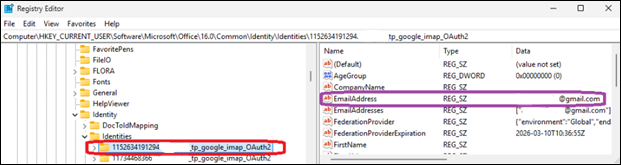
    Reg edit example

    Since this forum does not have access to your mailbox or server configuration, we can only provide guidance based on documentation and community reports. If there are any confirmed updates or official fixes, they will usually be shared through Microsoft documentation or support channels.

    I hope this information helps for now.


    If the answer is helpful, please click "Accept Answer" and kindly upvote it. If you have extra questions about this answer, please click "Comment". 

    Note: Please follow the steps in our documentation to enable e-mail notifications if you want to receive the related email notification for this thread.


1 additional answer

Sort by: Most helpful
  1. Q&A Assist
    2026-03-11T14:01:15.9766667+00:00
    AI generated content. This question contains an answer created with AI from Q&A Assist. Learn more

    Follow these steps in order, checking Outlook after each step:

    1. Confirm Windows and Office are fully updated
      Out-of-date Outlook or Windows can cause send/receive and sync errors. Run Windows Update and install all Office/Outlook updates, then restart Windows.
    2. Verify basic connectivity and sync
      • Open a browser and confirm that sites such as http://www.microsoft.com or http://www.bing.com load correctly.
      • In classic Outlook, go to the View tab and select the Sync button to force a manual sync. Watch the status bar at the bottom to see if sync completes or still shows the 0x800CCC0E error.
    3. Check for known IMAP/POP TLS issue (0x800CCC0E / server interrupted)
      If this is an IMAP or POP account and the error mentions the connection being interrupted or the server unexpectedly terminating the connection, there may be a TLS 1.3 issue on the machine. The documented fix is:
      1. Open Registry Editor and review the Protocols key under the TLS configuration.
      2. If a TLS 1.3 subkey exists under Protocols, export that key (backup) and then delete the TLS 1.3 key and its subkeys.
      3. Restart Outlook. If sync still does not work, restart Windows and test again. After this change, the Protocols section should no longer show any TLS 1.3 keys.
    4. Repair the Outlook data file (if using a local PST/OST)
      If the account uses a local Outlook data file, corruption can cause send/receive and sync errors. Run the Inbox Repair Tool (ScanPST) against the .pst file as described in Repair your Outlook personal folders file (.pst). This process typically takes about 15 minutes. Then reopen Outlook and test send/receive.
    5. Fix profile or software issues if Outlook still cannot connect
      • Run Windows Update again to ensure all Office components are current.
      • If multiple users in the organization see similar issues, an admin should check the Microsoft 365 Service health status for Exchange Online.
      • If the problem appears isolated to this profile, create a new Outlook profile and re-add the account, then test send/receive.
    6. If the account is Gmail in classic Outlook
      For Gmail accounts specifically, 0x800CCC0E with “cannot connect to the server” when synchronizing subscribed folders can occur if the Gmail consent for Microsoft apps was not granted correctly. On current builds, use the Retry option in the error dialog to repeat the browser sign-in and ensure the permission “Read, compose, send, and permanently delete all your email from Gmail.” is checked. If that does not work, follow the documented manual workaround for reauthorizing the Gmail account.

    If, after these steps, Outlook still shows 0x800CCC0E, capture the exact account type (Exchange, Microsoft 365, IMAP/POP, Gmail) and whether other devices can access the same mailbox, then proceed with more targeted diagnostics (for example, Microsoft 365 connectivity diagnostics for Exchange Online accounts).


    References:

    0 comments No comments

Your answer

Answers can be marked as 'Accepted' by the question author and 'Recommended' by moderators, which helps users know the answer solved the author's problem.