Note
Access to this page requires authorization. You can try signing in or changing directories.
Access to this page requires authorization. You can try changing directories.
This article is the third in a series about disaster recovery (DR) for an Azure data platform. It describes the DR impact and required activities for each component in the data platform across different failure scenarios, including Azure datacenter failures, availability zone failures, and regional failures.
Data service topology
At a high-level the data service topology for Contoso's data platform can be illustrated as:
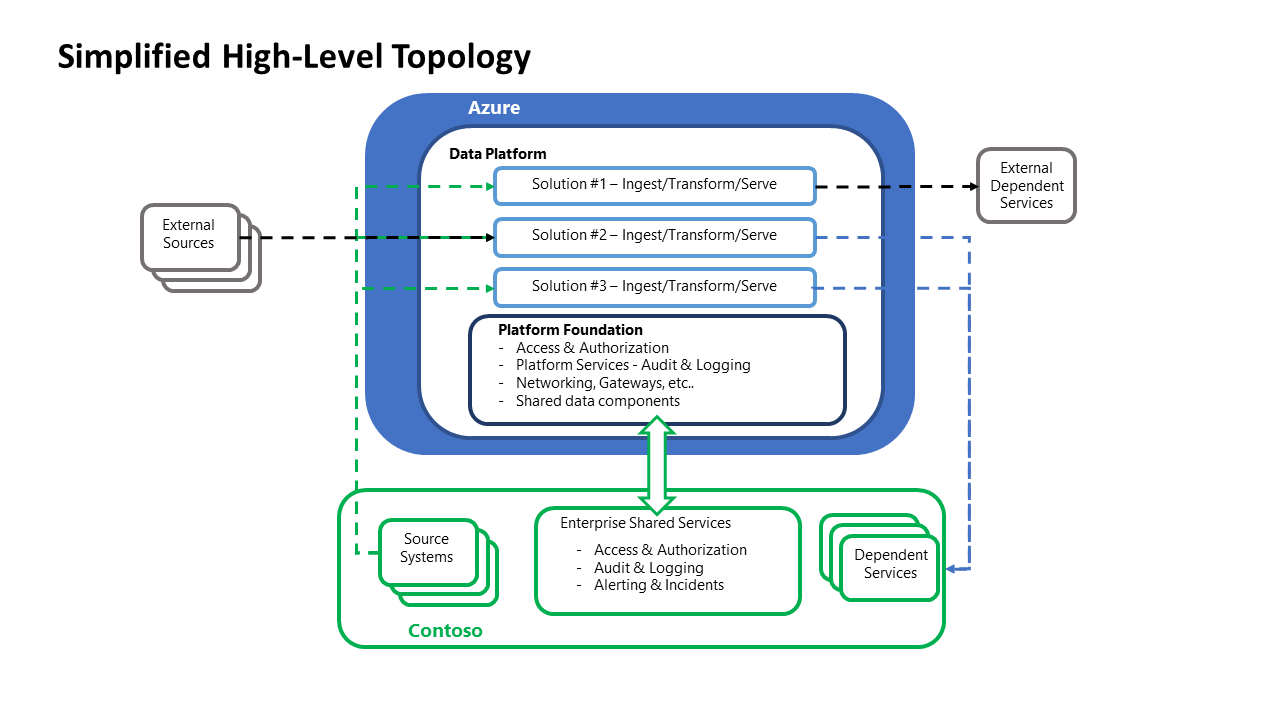 This logical diagram abstracts the key functions of the Contoso data ecosystem into a simplified, high-level view. This abstracted view supports the sections covering the scenario deployments, in line with the DR strategy selection and the segregation of responsibilities in a service recovery process.
DR impact vs customer activity
The following sections present a breakdown of Contoso activity necessary across DR events of varying impacts.
Area: Foundational components
Microsoft Entra ID including role entitlements
- Contoso SKU selection: Premium P1
- DR impact:
- Azure datacenter failure: N/A
- Availability Zone failure: N/A
- Azure regional failure: N/A
Management Groups
- Contoso SKU selection: N/A
- DR impact:
- Azure datacenter failure: N/A
- Availability Zone failure: N/A
- Azure regional failure: N/A
Subscriptions
- Contoso SKU selection: N/A
- DR impact:
- Azure datacenter failure: N/A
- Availability Zone failure: N/A
- Azure regional failure: N/A
Azure Key Vault
- Contoso SKU selection: Standard
- DR impact:
- Azure datacenter failure: N/A
- Availability Zone failure: N/A
- Azure regional failure: N/A
Azure Monitor
- Contoso SKU selection: N/A
- DR impact:
- Azure datacenter failure: N/A
- Availability Zone failure: N/A
- Azure regional failure: N/A
Microsoft Defender for Cloud
- Contoso SKU selection: N/A
- DR impact:
- Azure datacenter failure: N/A
- Availability Zone failure: N/A
- Azure regional failure: N/A
Cost Management
- Contoso SKU selection: N/A
- DR impact:
- Azure datacenter failure: N/A
- Availability Zone failure: N/A
- Azure regional failure: N/A
Azure DNS
- Contoso SKU selection: N/A
- DR impact:
- Azure datacenter failure: N/A
- Availability Zone failure: N/A
- Azure regional failure: N/A
Virtual networks, including subnets, user-defined routes (UDRs), and network security groups (NSGs)
- Contoso SKU selection: N/A
- DR impact:
- Azure datacenter failure: N/A
- Availability Zone failure: N/A
- Azure regional failure: Contoso would need to redeploy the Foundation and Data platform virtual networks with their attached UDRs and NSGs into the secondary region.
- Notes:
- Traffic Manager can be used to geo-route traffic between regions that hold replica virtual network structures. If they have the same address space, they can't be connected to the on-premises network, as it would cause routing issues. At the time of a disaster and loss of a virtual network in one region, you can connect the other virtual network in the available region, with the matching address space to your on-premises network.
Resource Groups
- Contoso SKU selection: N/A
- DR impact:
- Azure datacenter failure: N/A
- Availability Zone failure: N/A
- Azure regional failure: Contoso would need to redeploy the Foundation and Data platform Resource groups into the secondary region.
- Notes:
- This activity would be mitigated by implementing the "Warm Spare" strategy, having the network and resource group topology available in the secondary region.
VPN Gateway
- Contoso SKU selection: VpnGw1
- DR impact:
- Azure datacenter failure: N/A
- Availability Zone failure: Contoso would need to validate availability and redeploy if necessary.
- Azure regional failure: Contoso would need to redeploy the Foundation VPN Gateways into the secondary region.
- Notes:
- VPN Gateways can be created with Availability Zones for increased availability.
- A "Warm Spare" strategy would mitigate this activity.
Azure DevOps
- Contoso SKU selection: DevOps Services
- DR impact:
- Azure datacenter failure: N/A
- Availability Zone failure: N/A
- Azure regional failure: N/A
- Notes:
- DevOps Services is built upon the Azure backbone and uses Azure blob storage with geo-replication to ensure reliability.
Area: Data Platform components
Storage Account – Azure Data Lake Gen2
- Contoso SKU selection: locally redundant storage (LRS)
- DR impact:
- Azure datacenter failure: Not applicable
- Availability zone failure: Contoso needs to validate availability and redeploy if necessary.
- Azure regional failure: Contoso needs to redeploy the Data Platform storage accounts and rehydrate them with data in the secondary region.
- Notes:
- Storage Accounts have a broad range of data redundancy options from primary region redundancy up to secondary region redundancy.
- For Secondary region redundancy data is replicated to the secondary region asynchronously. A failure that affects the primary region might result in data loss if the primary region can't be recovered. Azure Storage typically has a recovery point objective (RPO) of less than 15 minutes.
- In the case of a regional outage, Storage accounts which, are geo-redundant, would be available in the secondary region as LRS. Additional configuration would need to be applied to uplift these components in the secondary region to be geo-redundant.
Microsoft Fabric – OneLake
- Contoso SKU selection: Fabric Storage
- DR impact:
- Azure datacenter failure: Not applicable
- Availability zone failure: Contoso needs to validate availability and redeploy if necessary.
- Azure regional failure: Microsoft handles the regional failures. OneLake data is available via the API. For more information, see DR and data protection for OneLake.
- DR impact:
- Contoso SKU selection: Fabric Storage
Fabric – Data Warehouse
- Contoso SKU selection: Fabric capacity
- DR impact:
- Azure datacenter failure: Not applicable
- Availability zone failure: Not applicable
- Azure regional failure: Contoso needs to deploy and restore the Fabric data platform into the secondary region and redeploy the warehouse.
- Notes:
- Cross-region restore:
- You can't restore a warehouse from one region or workspace to another. You must redeploy schema and reingest data.
- You can pause Fabric capacity after restoration. During this paused state, only storage costs are incurred, which makes it a cost-effective strategy for maintaining a live snapshot.
- Cross-region restore:
Fabric – Pipelines
- Contoso SKU selection: Fabric capacity
- DR impact:
- Azure datacenter failure: Not applicable
- Availability zone failure: Not applicable
- Azure regional failure: Contoso needs to deploy and restore the Fabric data platform into the secondary region and redeploy the pipelines.
Azure Event Hubs
- Contoso SKU selection: Standard
- DR impact:
- Azure datacenter failure: N/A
- Availability Zone failure: N/A
- Azure regional failure: Contoso would need to redeploy the Event Hubs instance into the secondary region.
- Notes:
- When you use the Azure portal, zone redundancy via support for availability zones is automatically enabled, this can be disabled via using the Azure CLI or PowerShell commands.
- Zone redundancy provides local resilience (continued operation during a zone outage). For region-wide disruptions, you should use Event Hubs geo-disaster recovery feature to restore operations in a secondary region. See Geo-disaster recovery.
Azure IoT Hubs
- Contoso SKU selection: Standard
- DR impact:
- Azure datacenter failure: N/A
- Availability Zone failure: N/A
- Azure regional failure: Contoso would need to redeploy the IoT Hub into the secondary region.
- Notes:
- IoT Hub provides Intra-Region HA and will automatically use an availability zone if created in a predefined set of Azure regions.
Azure Stream Analytics
- Contoso SKU selection: Standard
- DR impact:
- Azure datacenter failure: N/A
- Availability Zone failure: N/A
- Azure regional failure: Contoso would need to redeploy the IoT Hub into the secondary region.
- Notes:
- A key feature of Stream Analytics is its ability to recover from Node failure.
Azure Machine Learning
- Contoso SKU selection: General Purpose – D Series instances
- DR impact:
- Azure datacenter failure: Contoso would need to validate availability and redeploy if necessary.
- Availability Zone failure: Contoso would need to validate availability and redeploy if necessary.
- Azure regional failure: Contoso would need to redeploy Machine Learning into the secondary region.
- Notes:
- While Microsoft manages the Machine Learning infrastructure, the customer manages the associated resources. Only Key Vault is highly available by default.
- Depending on the service criticality supported, Microsoft recommends a multi-regional deployment.
Microsoft Foundry
- Contoso SKU selection: Provisioned throughput units (PTUs) or pay-as-you-go
- DR impact:
- Azure datacenter failure: Contoso validates service availability and redeploys Foundry resources if necessary.
- Availability zone failure: Contoso confirms availability and redeploys workloads to another zone within the same region.
- Azure regional failure: Contoso redeploys Foundry resources in a secondary region to maintain continuity.
- Notes:
- Microsoft manages the Foundry platform infrastructure, but customers handle associated resources like storage accounts, compute clusters, and networking to ensure high availability and DR.
- We recommend that you design for Foundry Agent Service disaster recovery.
- Customers implement backup strategies for custom models, datasets, and configuration artifacts because the platform doesn't automatically replicate them across regions.
Fabric – Eventhouse
- Contoso SKU selection: Fabric capacity
- DR impact:
- Azure datacenter failure: Not applicable
- Availability zone failure: Not applicable
- Azure regional failure: Contoso redeploys Fabric eventhouses and pipelines in the secondary region.
Fabric – Lakehouse
- Contoso SKU selection: Fabric capacity
- DR impact:
- Azure datacenter failure: Not applicable
- Availability zone failure: Not applicable
- Azure regional failure: Contoso needs to redeploy Fabric lakehouses and pipelines in the secondary region and restores the Fabric data platform there. The lakehouse is redeployed in the secondary region.
Power BI
- Contoso SKU selection: Fabric capacity or Power BI Pro
- DR impact:
- Azure datacenter failure: Not applicable
- Availability zone failure: Not applicable
- Azure regional failure: Wait for a signal from Microsoft before you publish or edit.
- Notes:
- The customer doesn't need to do anything if the Power BI team declares an outage.
- A failed-over Power BI service instance only supports read operations. Reports that use Direct Query or Live connect don't work during a failover.
- Publishing restrictions: Contoso shouldn't publish or modify reports until Microsoft confirms that the failover instance is writable or that the primary region has been restored.
- Gateway limitations: On-premises data refreshes through Power BI gateways are paused during failover.
- The customer doesn't need to do anything if the Power BI team declares an outage.
Azure Cosmos DB
- Contoso SKU selection: Single Region Write with Periodic backup
- DR impact:
- Azure datacenter failure: N/A
- Availability Zone failure: N/A
- Azure regional failure: Contoso should monitor, ensuring there are enough provisioned request units (RUs) in the remaining regions to support read and write activities.
- Notes:
- Single-region accounts might lose availability following a regional outage. To ensure high availability of your Azure Cosmos DB instance, configure it with a single write region and at least a second (read) region and enable Service-Managed failover.
- To avoid the loss of write availability, configure production workloads to enable service-managed failover, which enables automatic failover to available regions.
Azure Data Share
- Contoso SKU selection: N/A
- DR impact:
- Azure datacenter failure: Contoso would need to validate availability and redeploy if necessary.
- Availability Zone failure: Contoso would need to validate availability and redeploy if necessary.
- Azure regional failure: Contoso would need to redeploy the Data Share into the secondary region.
- Notes:
- Azure Data Share isn't currently supported by Availability Zones.
- Uplifting Data Share to a HA deployment will address each of these outage risks.
Microsoft Purview
- Contoso SKU selection: N/A
- DR impact:
- Azure datacenter failure: N/A
- Availability Zone failure: Contoso would need to validate availability and redeploy if necessary.
- Azure regional failure: Contoso would need to deploy an instance of Microsoft Purview into the secondary region.
- Notes:
- This activity is mitigated by implementing the warm spare strategy, which means that a second instance of Microsoft Purview is available in the secondary region.
- A "Warm Spare" approach has the following key callouts:
- The primary and secondary Microsoft Purview accounts can't be configured to the same Azure Data Factory, Data Share, or Fabric accounts, if applicable. As a result, lineage from Azure Data Factory and Data Share isn't visible in the secondary Microsoft Purview accounts.
- The integration runtimes are specific to a Microsoft Purview account. As a result, if scans must run in primary and secondary Microsoft Purview accounts in parallel, multiple self-hosted integration runtimes must be maintained.
Note
This section is intended as general guidance. The vendor's documentation on disaster recovery, redundancy and backup should be consulted for the correct approach for a new component or service under consideration.
"Azure datacenter failure" covers the situation where the affected region does not have Availability Zones offered.
If new/updated configuration or releases occurred at the point of the disaster event, these should be checked and redeployed (if necessary) as part of the work to bring the platform up to the current date.
Next steps
Now that you've learned about the scenario details, you can learn about recommendations related to this scenario.