Note
Access to this page requires authorization. You can try signing in or changing directories.
Access to this page requires authorization. You can try changing directories.
Azure OpenAI provides access to OpenAI language models. This article describes key features of Azure OpenAI that support multitenant solutions and helps you plan your deployment approach.
Isolation models
When you have a multitenant system that uses Azure OpenAI, determine the level of isolation that your tenants require. Design your isolation model based on the following factors:
- The number of tenants that you plan to have
- Whether your tenants have compliance requirements that require network or infrastructure isolation
- Whether your tenants require models that you fine-tune by using their own data
- Whether your tenants require different model versions or model life cycles
The following table summarizes Azure OpenAI deployment approaches in a multitenant system.
| Considerations | Dedicated Azure OpenAI instance | Shared Azure OpenAI instance, dedicated model deployment for each tenant | Shared Azure OpenAI instance, shared model deployment | Tenant-provided Azure OpenAI instance |
|---|---|---|---|---|
| Data isolation | High | Medium | Low | High |
| Performance isolation | High | High | Low to medium, depending on the token-per-minute (TPM) usage for each tenant | High |
| Deployment complexity | Low to medium, depending on the number of tenants | Medium, you manage deployment names and quotas | Low | Not applicable, customer-managed |
| Operational complexity | Low | Medium | High | Low for the provider, medium to high for the tenant |
| Example scenario | Single tenant deployments that require network isolation from other tenants | Tenants that have specific model life cycle or fine-tuning requirements | Large multitenant solutions that have a shared application tier | Tenants that have specific compliance or fine-tuning requirements |
Dedicated Azure OpenAI instance
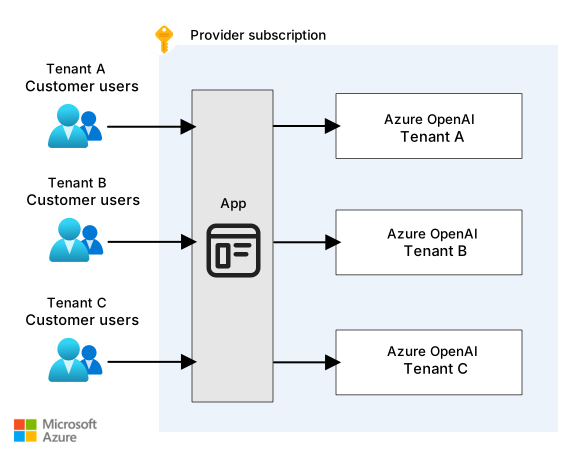
If you're a service provider, consider deploying a separate Azure OpenAI instance for each tenant in your Azure subscription. This approach provides data isolation between tenants. But as your tenant count grows, you must deploy and manage more Azure OpenAI resources.
Use this approach if you have separate application deployments for each tenant or if you need to avoid limitations, like quota and rate limits. For more information, see Azure OpenAI quotas and limits.
The following diagram shows an Azure OpenAI instance for each tenant in the provider's subscription.
Shared Azure OpenAI instance
You can share an instance of Azure OpenAI among multiple tenants. You deploy and manage the Azure OpenAI resource in your (the service provider's) Azure subscription. This solution is the easiest to implement, but it provides the least data isolation and performance isolation.
A shared Azure OpenAI resource doesn't provide security segmentation for each model deployment. A tenant can potentially use a model that they aren't authorized to use. Don't share an Azure OpenAI instance when you use fine-tuned models. You might expose sensitive information and allow unauthorized access to tenant-specific data or resources.
A shared Azure OpenAI instance can also lead to a noisy neighbor problem, which causes higher latency for some tenants. You must make your application code multitenancy-aware. For example, to charge customers for their consumption of a shared instance, implement logic to track token usage for each tenant in your application.
You can also deploy multiple shared Azure OpenAI instances. For example, if you follow the Deployment Stamps pattern, deploy a shared Azure OpenAI instance in each stamp. If you deploy a solution in multiple regions, deploy Azure OpenAI in each region to get the following benefits:
- Avoid cross-region traffic latency
- Support data residency requirements
- Allow Azure services that require same-region deployments to connect to Azure OpenAI
When you share an Azure OpenAI instance, understand its limits and manage your quota carefully.
The following diagram shows the shared Azure OpenAI model.

Within a shared Azure OpenAI instance, you can share model deployments among tenants or create dedicated deployments for specific tenants.
Shared model deployment among tenants
A shared model deployment reduces your operational burden. You manage fewer deployments and track fewer model versions. Use a shared model deployment when possible, and create dedicated deployments only when tenants need specific capabilities.
Dedicated model deployment for each tenant
If tenants have requirements that you can't meet with a shared deployment, create a dedicated model deployment. This model provides the following capabilities:
Quota and cost management: You can allocate TPM quotas per tenant and track token usage for precise cost allocation. If you use provisioned throughput units (PTUs), you can assign them to specific customers and use different billing models for other customers.
Content filtering policies: Some tenants might need a custom content filtering policy, like a block list of disallowed words. Configure the content filtering policy at the model deployment level.
Model types and versions: Different tenants might require different models, model versions, or independent model life cycle management.
Tenant-specific fine-tuning: Each fine-tuned model requires its own deployment. But fine-tuning isn't required for most use cases. You can usually ground your model by using the Azure OpenAI on your data feature or another retrieval-augmented generation (RAG) approach.
Data residency: This approach supports distinct data residency requirements. For example, you might provide a regional model deployment for a tenant that has strict data residency needs and use a global model deployment for other tenants.
Each model deployment has a unique URL, but all Azure OpenAI deployments share the same underlying model infrastructure.
Azure OpenAI doesn't enforce access control for each model deployment. Your application must enforce the tenant-to-deployment access rules.
Tenant-provided Azure OpenAI resource
Your tenants can create Azure OpenAI instances in their own Azure subscriptions and grant your application access. Consider this approach for the following scenarios:
Tenants have specific quotas and permissions from Microsoft, including access to specific models, defined content filtering policies, or provisioned throughput usage.
Tenants have a fine-tuned model that they need to use from your solution.
Tenants require a component in their environment to process and send data through their customer-managed Azure OpenAI instance for processing.
To access an Azure OpenAI instance in your tenant's subscription, the tenant must grant your application access. Your application must authenticate through its Microsoft Entra instance. One approach is to publish a multitenant Microsoft Entra application. The following workflow outlines this approach:
The tenant registers the multitenant Microsoft Entra application in its own Microsoft Entra tenant.
The tenant grants the multitenant Microsoft Entra application the appropriate level of access to the Azure OpenAI resource. For example, the tenant might assign the application to the Azure OpenAI User role by using role-based access control (RBAC).
The tenant provides the resource ID of the Azure OpenAI resource that it creates.
Your application code can use a service principal that's associated with the multitenant Microsoft Entra application in your own Microsoft Entra instance to access the tenant's Azure OpenAI instance.
Alternatively, each tenant can create a service principal for your service to use and give you its credentials. This approach requires you to securely store and manage credentials for each tenant, which is a potential security liability.
If your tenants configure network access controls on their Azure OpenAI instance, ensure that you can access them.
The following diagram shows an Azure OpenAI instance for each tenant in the tenant subscription.

Features of Azure OpenAI that support multitenancy
Azure OpenAI provides the following features that support multitenancy.
Responses API
The Responses API is a stateful API that unifies conversation management, tool invocation, file search, background task processing, and structured outputs in a single interface.
The Responses API makes tenant data isolation between tenants challenging because you can't attach tenant identifiers to all tools and capabilities.
If you use the Responses API in a multitenant solution, consider tenant isolation for all stored data and operations that you control. The API stores conversation history by using response IDs that link requests to previous context. Store response IDs with tenant-scoped keys in your application so that requests can only reference response IDs associated with the same tenant.
The Responses API supports function calling and built-in tools. For function calling, your application code handles the function invocation, so ensure that your function calls are multitenant-aware. Include the tenant ID in calls to downstream APIs or functions. For built-in tools like Code Interpreter and remote Model Context Protocol (MCP) server calls, the model infrastructure runs these operations. You can't reliably inject tenant context into built-in tool invocations, so use dedicated containers or separate tool configurations for each tenant.
When you use file search or RAG capabilities, scope file stores and vector indexes to the appropriate tenant. For shared indexes, apply tenant filters to all queries. For per-tenant indexes, map each request to the correct index based on the tenant identifier. For more information, see Design a secure multitenant RAG inferencing solution.
The Responses API supports a background mode for long-running operations. Store task identifiers with the tenant context and validate the tenant when you poll for results. Ensure that task queues and result storage prevent tenants from accessing each other's background tasks or outputs.
Assistants API
The Assistants API extends Azure OpenAI with capabilities to create AI assistants. The API can call tools and other APIs, search files to ground model responses, manage persistent conversation threads, and generate and run code in a sandboxed environment. To support these capabilities, the Assistants API stores data.
In a multitenant solution, you can dedicate assistants to individual tenants or share assistants across tenants. Consider tenant isolation in all stored data, especially for shared assistants. For example, store conversational threads separately for each tenant.
The Assistants API supports function invocation, which sends your application instructions about which functions to call and which arguments to include. Ensure that your function calls are multitenant-aware by including the tenant ID in calls to downstream systems. Verify the tenant ID in your application code. Don't rely on the language model to propagate tenant information.
Azure OpenAI on your data feature
The Azure OpenAI on your data feature lets the large language model directly query your knowledge sources, like indexes and databases, to ground its responses. When you make a request, you can specify the data sources to query.
In a multitenant solution, ensure that your data sources are multitenancy-aware and that you can specify tenant filters on your requests. Propagate the tenant ID to the data source appropriately. For example, if you query Azure AI Search that stores data for multiple tenants in a single index, specify a filter to return only the current tenant's ID. If you create an index for each tenant, specify the correct index for the current tenant.
Batch deployments
Batch deployments process grouped requests asynchronously by using a separate batch quota. Batch requests have a 24-hour target turnaround and cost less than standard deployments. Unlike standard deployments, batch quotas limit enqueued tokens rather than TPM.
Use batch deployments when you don't need immediate responses and want to process large volumes of requests without disrupting real-time workloads. For example, a sentiment analysis system can use a batch deployment to avoid throttling the standard deployment quota that it needs to conduct real-time interactions in other applications. This approach also reduces processing costs.
In a multitenant solution, you can share batch deployments among tenants or create separate deployments for each tenant:
Separate batch deployments for each tenant: Assign token quotas to each tenant-specific batch deployment to prevent any single tenant from monopolizing resources. This approach also lets you track token usage per tenant for cost allocation.
Shared batch deployment: A shared batch deployment can process requests from multiple tenants in combined or separate batch jobs. If you combine requests into a single batch job, ensure that you can map responses back to the correct tenant. You manage batch jobs at the job level, so separate batch jobs by tenant. Then you can cancel or delete jobs independently. You can't cancel or delete individual requests within a batch.
Carefully manage batch deployments to balance cost efficiency and resource allocation while maintaining tenant isolation and operational flexibility.
Contributors
Microsoft maintains this article. The following contributors wrote this article.
Principal author:
- Sofia Ferreira | Software Engineer, ISV & DN CoE
Other contributors:
- John Downs | Principal Software Engineer, Azure Patterns & Practices
- Landon Pierce | Customer Engineer, ISV & DN CoE
- Paolo Salvatori | Principal Customer Engineer, ISV & DN CoE
- Daniel Scott-Raynsford | Partner Solution Architect
- Arsen Vladimirskiy | Principal Customer Engineer, ISV & DN CoE
To see nonpublic LinkedIn profiles, sign in to LinkedIn.