Note
Access to this page requires authorization. You can try signing in or changing directories.
Access to this page requires authorization. You can try changing directories.
Microsoft 365 Copilot operates within the Microsoft 365 service boundary and honors the same data protection, access control, and compliance capabilities that apply across Microsoft 365.
This article describes the data protection architecture for Microsoft 365 Copilot. It explains how Copilot works with Microsoft Purview sensitivity labels and encryption, how SharePoint and OneDrive access controls affect Copilot, and where Copilot interaction data is stored for auditing and compliance scenarios.
This article is intended for IT administrators who want to understand how data flows through Copilot and how existing Microsoft 365 protections are enforced. It doesn't provide deployment steps or remediation guidance.
Tip
To learn more how Microsoft 365 Copilot uses your data, see:
How Microsoft 365 Copilot works with sensitivity labels and encryption
Copilot works with Microsoft Purview sensitivity labels and encryption to enforce access controls and protection settings during grounding and content generation.
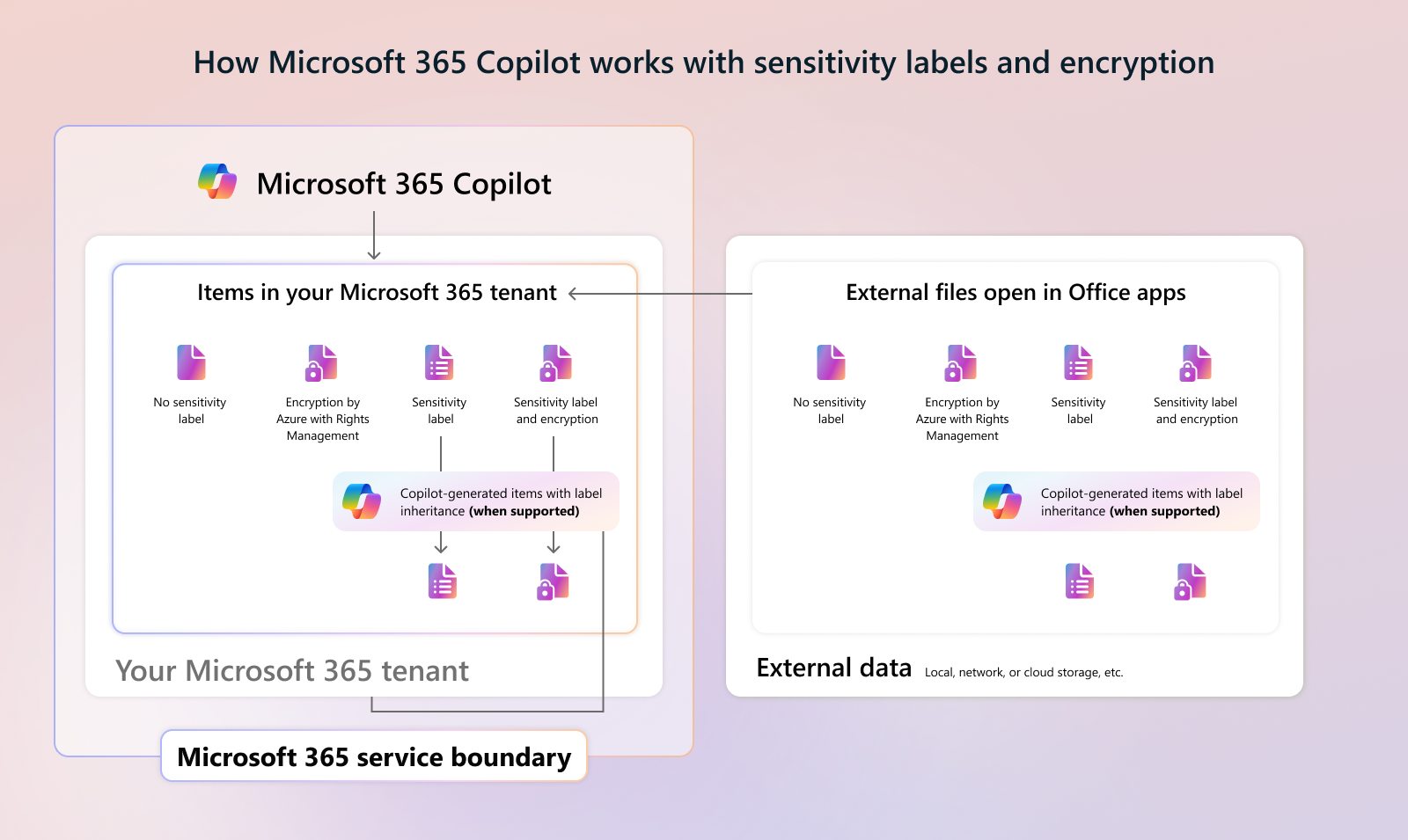
In this flow:
- Copilot can only summarize or reference content that the user is authorized to access.
- When encryption is applied, the user must have EXTRACT and VIEW usage rights for Copilot to interact with the content.
- Items encrypted by Azure Rights Management without a sensitivity label still require EXTRACT or VIEW usage rights for the user for Copilot to summarize the content.
- In Copilot Chat interactions, sensitivity labels can be displayed for returned data. The response reflects the highest‑priority label.
- When Copilot generates new content based on labeled sources, the highest‑priority sensitivity label is inherited when supported.
- Protection settings remain enforced even when labeled files are stored outside the Microsoft 365 tenant.
To learn more, see the following articles:
- Get started with sensitivity labels
- Microsoft Purview strengthens information protection for Copilot
How SharePoint and OneDrive access controls affect Copilot
SharePoint and OneDrive access controls influence what Copilot can discover and reference, without changing user permissions.

These controls include:
- Search and discovery settings that limit which sites appear in Copilot and organization‑wide search.
- Sharing and membership controls that affect how broadly content can be accessed.
- Governance and lifecycle policies that reduce long‑term oversharing risk.
- Information protection policies that restrict Copilot access based on sensitivity labels and DLP conditions.
For prescriptive remediation guidance, see Microsoft 365 Copilot blueprint for oversharing.
Where Copilot usage data is stored and how it's audited
Copilot interaction data is stored within Microsoft 365 services and can be discovered, audited, and retained using Microsoft Purview capabilities.

Microsoft 365 can capture:
- Audit records for Copilot prompts, responses, and referenced content.
- Copilot interaction data for eDiscovery and compliance investigations.
- Retained versions of referenced files through cloud attachments and Preservation Hold Libraries.
- User‑uploaded files stored in OneDrive Copilot Chat folders.
- Content created with Copilot Pages stored in user‑owned SharePoint Embedded containers.
Retention and deletion behavior follows configured Microsoft Purview retention policies. To learn more, see Learn about retention for Copilot.