Note
Access to this page requires authorization. You can try signing in or changing directories.
Access to this page requires authorization. You can try changing directories.
Important
This feature is in preview.
Azure Translator in Foundry Tools is a Foundry Tool that enables you to perform language translation and other language-related operations.
This sample shows how to use the prebuilt Azure AI translator in Fabric with RESTful APIs to:
- Translate text
- Transliterate text
- Get supported languages
Prerequisites
Get a Microsoft Fabric subscription. Or, sign up for a free Microsoft Fabric trial.
Sign in to Microsoft Fabric.
Switch to Fabric by using the experience switcher on the lower-left side of your home page.
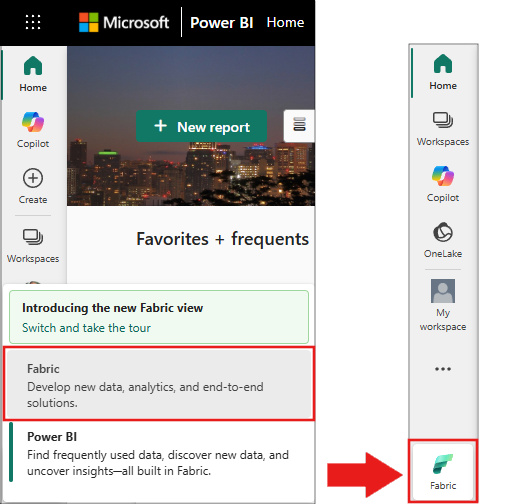
- Create a new notebook.
- Attach your notebook to a lakehouse. On the left side of your notebook, select Add to add an existing lakehouse or create a new one.
Note
This article uses Microsoft Fabric's built-in prebuilt Foundry Tools, which handle authentication automatically. You don't need to obtain a separate Foundry Tools key - the authentication is managed through your Fabric workspace. For more information, see Prebuilt AI models in Fabric (preview).
The code samples in this article use libraries that are preinstalled in Microsoft Fabric notebooks:
- SynapseML: Preinstalled in Fabric notebooks for machine learning capabilities
synapse.ml.core- Core SynapseML functionalitysynapse.ml.fabric.service_discovery- Fabric service discovery utilitiessynapse.ml.fabric.token_utils- Authentication token utilitiessynapse.ml.services- Foundry Tools integration (includes Translate, Transliterate classes)
- PySpark: Available by default in Fabric Spark compute
pyspark.sql.functions- DataFrame transformation functions (col,flatten)
- Standard Python libraries: Built into Python runtime
json- JSON parsing and formattingrequests- HTTP client for REST API calls
# Get workload endpoints and access token

from synapse.ml.fabric.service_discovery import get_fabric_env_config
from synapse.ml.fabric.token_utils import TokenUtils
import json
import requests


fabric_env_config = get_fabric_env_config().fabric_env_config
auth_header = TokenUtils().get_openai_auth_header()

# Make a RESTful request to Foundry Tool
prebuilt_AI_base_host = fabric_env_config.ml_workload_endpoint + "cognitive/texttranslation/"
print("Workload endpoint for Foundry Tool: \n" + prebuilt_AI_base_host)

service_url = prebuilt_AI_base_host + "language/:analyze-text?api-version=2022-05-01"
print("Service URL: \n" + service_url)

auth_headers = {
    "Authorization" : auth_header
}

def print_response(response):
    print(f"HTTP {response.status_code}")
    if response.status_code == 200:
        try:
            result = response.json()
            print(json.dumps(result, indent=2, ensure_ascii=False))
        except:
            print(f"parse error {response.content}")
    else:
        print(f"error message: {response.content}")
Text Translation
Text translation is the core operation of the Translator service.
service_url = prebuilt_AI_base_host + "translate?api-version=3.0&to=fr"
post_body = [{'Text':'Hello, friend.'}]

response = requests.post(service_url, json=post_body, headers=auth_headers)

# Output all information of the request process
print_response(response)
Output
    HTTP 200
    [
      {
        "detectedLanguage": {
          "language": "en",
          "score": 1.0
        },
        "translations": [
          {
            "text": "Bonjour cher ami.",
            "to": "fr"
          }
        ]
      }
    ]
Text Transliteration
Transliteration converts a word or phrase from the script (alphabet) of one language to another, based on phonetic similarity.
service_url = prebuilt_AI_base_host + "transliterate?api-version=3.0&language=ja&fromScript=Jpan&toScript=Latn"
post_body = [
    {"Text":"こんにちは"},
    {"Text":"さようなら"}
]

response = requests.post(service_url, json=post_body, headers=auth_headers)

# Output all information of the request process
print_response(response)
Output
HTTP 200
[
{
"text": "Kon'nichiwa",
"script": "Latn"
},
{
"text": "sayonara",
"script": "Latn"
}
]
Supported Languages Retrieval
Returns a list of languages that Translator operations support.
service_url = prebuilt_AI_base_host + "languages?api-version=3.0"

response = requests.get(service_url, headers=auth_headers)

# Output all information of the request process
print_response(response)