Note
Access to this page requires authorization. You can try signing in or changing directories.
Access to this page requires authorization. You can try changing directories.
Note
Community interest groups have now moved from Yammer to Microsoft Viva Engage. To join a Viva Engage community and take part in the latest discussions, fill out the Request access to Finance and Operations Viva Engage Community form and choose the community you want to join.
This article describes the workflow system.
What is workflow?
You can define the term workflow in two ways: as a system and as a business process.
Workflow is a system
Workflow is a system that runs on the Application Object Server (AOS). The workflow system provides functionality that you can use to create individual workflows, or business processes.
Workflow is a business process
A workflow represents a business process. It defines how a document flows, or moves, through the system by showing who must complete a task, make a decision, or approve a document. For example, the following illustration shows a workflow for expense reports.
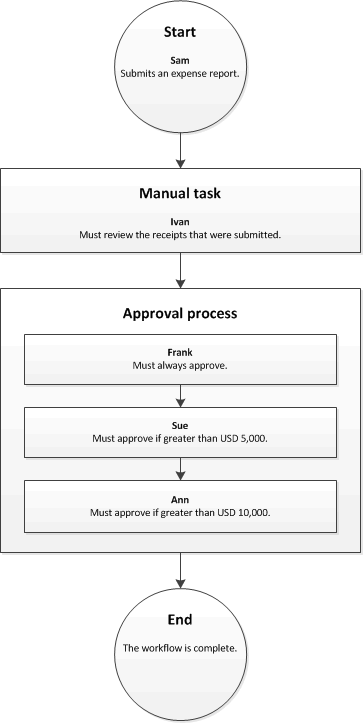
To better understand this workflow, suppose that Sam submits an expense report for USD 7,000. In this scenario, Ivan must review the receipts that Sam submitted. Then Frank and Sue must approve the expense report. Now suppose that Sam submits an expense report for USD 11,000. In this scenario, Ivan must review the receipts, and Frank, Sue, and Ann must approve the expense report.
Benefits of using the workflow system
Use the workflow system in your organization to get these benefits:
- Consistent processes – Define how to process specific documents, such as purchase requisitions and expense reports. By using the workflow system, you ensure that documents are processed and approved in a consistent and efficient manner.
- Process visibility – Track the status, history, and performance metrics of workflow instances. This information helps you determine whether you need to make changes to the workflow to improve efficiency.
- Centralized work list – View a centralized work list that displays the workflow tasks and approvals assigned to you.
Workflow content
- Workflow system architecture
- Workflow elements
- Actions in workflow approval processes
- Create workflows overview
- Configure workflow properties
- Configure manual tasks in a workflow
- Configure automated tasks in a workflow
- Configure approval processes in a workflow
- Configure approval steps in a workflow
- Configure manual decisions in a workflow
- Configure conditional decisions in a workflow
- Configure parallel activities in a workflow
- Configure parallel branches in a workflow
- Configure line-item workflows
- Workflow FAQ